An electrical crew is three days into rough-in when they hit a wall—literally. The electrical plans call for a panel location that conflicts with the structural drawings. Nobody on site has the authority to just pick one and move on. Work stops, the super makes a call, and everyone waits.
This is the moment an RFI exists for.
Handled well, a Request for Information turns a potential standstill into a timely resolution. Handled poorly—buried in an email thread, missing key details, or stuck waiting on a response nobody's tracking—it becomes exactly the kind of delay it was designed to prevent.
This guide covers what an RFI is, how it differs from a submittal or transmittal, when to use one, the process from drafting to closeout, and the mistakes that turn a routine clarification into a schedule problem.
What Is an RFI in Construction?
An RFI, or Request for Information, is a formal written request used to resolve a gap, conflict, or ambiguity in a project's plans, specifications, or contract documents. It's a formal mechanism used by contractors or subcontractors to get an official answer from the architect, engineer, or owner's representative before proceeding with work that depends on that answer.
RFIs typically follow an established project hierarchy: a subcontractor raises a question, it routes through the general contractor, and the GC submits it to the design team for a formal response. That chain matters—it's what makes an RFI a documented, accountable record rather than a hallway conversation.
An RFI is warranted when:
- Plans and specifications contradict each other
- A detail is missing that's needed to proceed with a specific scope of work
- Field conditions don't match what's shown in the drawings
- A specified material or method is unclear or conflicts with actual project conditions, and clarification is needed before proceeding
Not every question needs to go through a formal RFI, but more on that shortly.
Who's Involved in the RFI Process
RFIs typically pass through three levels of a project team, and knowing where you sit in that chain is part of what keeps the process moving:
- Field teams and subcontractors are usually the ones who first spot the issue—a measurement that doesn't add up, a spec that conflicts with what's actually on site.
- The general contractor or project manager reviews the question, makes sure it's well-formed, and formally submits it to the design team. This is also usually who owns the RFI log and tracks it to resolution.
- The architect, engineer, or owner's representative provides the official answer, since they're the ones with authority over the design intent.
When the project’s communication protocol requires RFIs to follow that chain, skipping a level—like, a subcontractor emailing an architect directly—can create conflicts, confusion, and complications.
RFIs vs. Submittals vs. Transmittals:
How They're Different
These three documents get confused constantly, and mixing them up creates its own communication problems. Here's how they actually differ:
RFIs ask a question.
They're used when something in the plans or specs is unclear, contradictory, or incomplete, and the project can't move forward on that item until the design team responds. An RFI requires an answer.
Submittals provide proof.
They're the shop drawings, product data, and material samples a contractor submits before installing something, so the design team can confirm it matches the approved specifications. A submittal requires approval, not just information. Our Complete Guide to Construction Submittals covers this process in full.
Transmittals just move information.
They're the cover sheet or log confirming that a document, drawing, or set of files was sent from one party to another. No approval, no answer required—just a formal record that something changed hands.

Why RFIs Matter for Project Success
An unresolved ambiguity in the field doesn't stay small. When crews are waiting on clarification, work can slow or stop altogether—and making an assumption or unauthorized adjustment just to keep moving can create even bigger problems later. The RFI process is designed to give project teams a formal way to address questions when they arise and reduce potential rework, added cost, or schedule disruption.
Beyond keeping work moving, RFIs protect everyone involved. A logged RFI with a documented response is evidence that the issue was identified, raised through the proper channels, and formally addressed—which matters considerably if a dispute over cost, delay, or design intent comes up later. Without that paper trail, disagreements about who knew what and when become much harder to resolve.
There's also a compounding effect worth understanding. A single unanswered RFI rarely affects just one task or trade. The panel placement conflict from this article’s opening example doesn't just delay electrical—it can hold up drywall, inspections, and every downstream milestone scheduled behind it. The longer an RFI remains unresolved, the greater the risk that one unanswered question will impact overall project delivery. That’s why visibility, timely responses, and clear accountability are essential to effective RFI management.
What to Include in an RFI:
A Simple Template
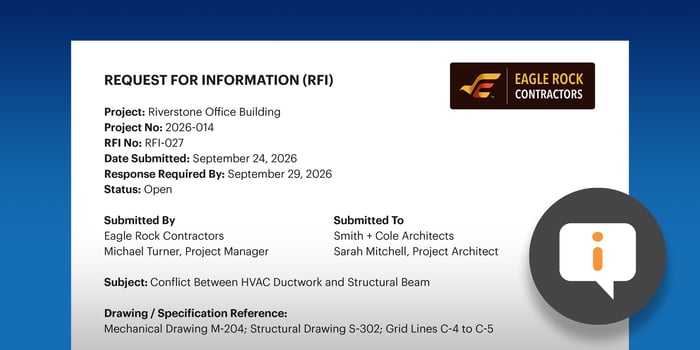
A well-structured RFI gets answered faster because it doesn't leave the reviewer guessing. At minimum, every RFI should include:
- RFI number and project name, so it's easily referenced and logged
- Date submitted and date needed by, tied to the actual schedule impact
- Subject line, summarizing the issue in one line (e.g., "Panel Location Conflict—Sheet E-201 vs. S-301")
- Detailed description of the issue, including which drawings, spec sections, or field conditions are involved
- Supporting references, such as photos, marked-up drawings, or spec excerpts
- A proposed solution, if the team submitting the RFI has one in mind
A template like this doesn't just speed up the response—it also makes the RFI log genuinely useful later, since every entry follows the same structure and can be searched, filtered, or reviewed as a set.
Sound good?
Get started today with ConstructionOnline’s free Construction RFI Template + RFI Log Template—free to download and easy to customize in Microsoft Excel or Google Sheets.

When to Submit an RFI
(and When Not To)
RFIs are most useful when the answer changes what gets built or how. That includes:
- Conflicting information between two sets of drawings or specs
- A missing dimension, detail, or material spec needed to proceed
- A field condition that doesn't match the plans
- A code or compliance question that affects the design as drawn
RFIs are the wrong tool when the question doesn’t require formal clarification from the design team or another authorized party. Routine coordination questions, information that belongs in the daily log, or minor field decisions clearly within your team’s existing scope of authority may not need to become formal RFIs. Submitting one anyway just adds noise to the log and slows down the RFIs that genuinely need a response.
That’s not just a theoretical concern: The Construction Management Association of America cites a report issued by the Navigant Construction Forum which found that 13.2% of the RFIs reviewed were classified as unjustifiable.

The RFI Process, Step by Step
1. Identify the Need for Clarification
This starts in the field or during plan review—someone notices a conflict, a gap, or a detail that doesn't add up. The sooner it's caught, the less it costs to fix. An ambiguity flagged during preconstruction review may be a quick clarification. The same ambiguity discovered mid-installation may become a delay.
2. Draft a Clear, Complete RFI
A well-written RFI answers the questions the design team would otherwise have to ask back. Draft the RFI using the simple template outlined above: clearly describe the issue, reference the relevant drawings or specifications, include a proposed solution when appropriate, and specify when a response is needed based on the project’s schedule.
Vague RFIs generate vague responses, or worse, a request for more information that costs another round-trip. Specificity here is what keeps the process fast.
3. Submit and Log the RFI
Once drafted, the RFI gets formally submitted and logged—ideally in a centralized system rather than an email thread that's easy to lose track of. Every RFI should have a unique identifier, a submission date, an assigned reviewer, and a due date that everyone can see.
4. Review and Respond
The design team or owner's representative reviews the RFI and provides a formal, documented answer. A good response doesn't just answer the immediate question—it addresses whether the resolution affects cost, schedule, or other parts of the scope.
5. Close the Loop
Once a response comes back, it needs to be communicated to everyone whose work depends on it and reflected in the relevant drawings or specs if it changes anything. An RFI that gets answered but never actually reaches the crew waiting on it hasn't accomplished anything.
Best Practices for Managing RFIs
- Use a standardized format. A consistent RFI template means reviewers always know where to find the information they need, which speeds up response time and reduces the back-and-forth caused by incomplete submissions.
- Set and communicate response deadlines. Every RFI should have a due date tied to real schedule impact, not just a generic turnaround window. A deadline that isn't communicated up front is a lot easier to miss.
- Keep everything in one log. Scattered RFIs across email, text, and paper are how questions get lost and deadlines get missed. A single, shared log also means the whole team can see what's outstanding without having to ask.
- Assign clear ownership. Every RFI needs one person responsible for tracking it to resolution, on both the requesting and responding side. Without a named owner, follow-up becomes everyone's job and therefore no one's.
- Close the loop in writing. Verbal answers relayed secondhand are how misunderstandings happen. The formal, written response should be the version of record that everyone works from.
- Review RFI patterns regularly. A high volume of RFIs on a similar topic usually points to a recurring gap in how plans are being detailed or reviewed, and that's worth surfacing before the next question arises.

Common RFI Mistakes That Cost Time and Money
Picture a mid-size commercial build where RFIs are tracked across three different email inboxes, depending on who's handling them that week. A subcontractor submits a question about a mechanical conflict. It sits unanswered for more than a week because no one owns the response. By the time someone notices, the trade is behind schedule and asking for a change order related to the delay. None of this was one big mistake—it was several small process gaps compounding.
The most common RFI mistakes:
- Vague or incomplete RFIs that force a back-and-forth before the real question even gets answered
- No centralized log, so RFIs get lost in inboxes and nobody has visibility into what's outstanding
- No assigned response deadlines, so RFIs sit indefinitely without anyone flagging the delay
- Poor communication of the answer, where a response comes back but never reaches the crew waiting on it in the field
Every one of these is a process fix, not a people problem. The solution is a consistent RFI workflow that keeps questions, supporting information, responsibility, and response deadlines visible in one place.
How ConstructionOnline Simplifies Construction RFI Tracking
Most of the RFI challenges we just covered come down to the same issue: important questions, supporting documents, clear accountability, and response deadlines scattered across too many places. ConstructionOnline’s RFI Tracking brings the entire process into one centralized project record, giving teams a consistent, standardized workflow for creating detailed requests, attach supporting files & photos, assign responsibility, track responses, and follow each RFI through to resolution.
Built-in status tracking in ConstructionOnline makes it easy to see what’s waiting, overdue, or resolved, while dashboards, summaries, search, filters, and reports give project teams clear visibility into individual RFIs and overall RFI activity. And because ConstructionOnline is a complete project management system, RFIs live alongside the rest of your project data, right where schedules, change orders, daily logs, punch lists, and more are managed and stored. Keeping the complete RFI history stored alongside other critical project information makes the project record easier to manage, review, and reference.
ConstructionOnline also keeps outside project partners involved without forcing them into another complicated workflow. Architects, engineers, designers, and other external recipients can receive complete RFI details and attachments by email and respond directly from their inbox—just like they would to any other email. Their reply is automatically added to the RFI in ConstructionOnline—maintaining the convenience of email while ensuring the complete, traceable record that good RFI management requires.
Learn more about ConstructionOnline RFI Tracking here.
 Not ready for dedicated RFI software yet?
Download the free ConstructionOnline RFI Template + RFI Log Template to standardize your requests, document responses, and track RFIs from creation through resolution.
Construction RFI Tracking FAQs
What does RFI stand for in construction?
RFI stands for Request for Information—a formal request used to clarify ambiguous, conflicting, or missing information in project plans or specifications.
Who is responsible for responding to an RFI?
Typically the architect, engineer, or owner's representative responsible for the design documents in question. The general contractor typically manages the RFI process and routes questions from subcontractors to the appropriate party.
How long should an RFI response take?
Response timelines vary by contract and project needs, but they should always be tied to the actual schedule impact of the outstanding question. A Navigant Construction Forum analysis of more than 1 million RFIs found an average first-response time of 6.4 days and a median response time of 9.7 days—illustrating how easily response times can stretch beyond a week. The due date of the response should be communicated clearly when the RFI is submitted, and it should never be left open-ended.
What's the difference between an RFI and a change order?
An RFI clarifies existing plans or specs and doesn't itself authorize a cost or schedule change. If the answer to an RFI reveals that a change to scope, cost, or timeline is needed, that change gets formalized separately through a change order. For more on that process, see Change Orders 101: Everything You Need to Know.
Does submitting an RFI cost money?
Submitting the RFI itself doesn't have a direct cost, but the time spent waiting on a response can—particularly if it holds up work that's already scheduled. This is one of the main reasons response deadlines and a centralized log matter as much as the RFI's content.
How many open RFIs is too many?
There's no universal number, since it depends on project size and complexity. The more useful signal is trend and age: a growing backlog of unanswered RFIs, or RFIs that sit open well past their requested response date, usually points to a process gap worth addressing rather than an acceptable volume of questions.
Key Takeaways
RFIs exist to catch ambiguity before it becomes a delay. The process works when questions are specific, logged in one place, assigned an owner, and tracked to a documented resolution—and it breaks down when any one of those pieces is missing.
If your team is ready to move RFIs out of scattered inboxes and into one connected system, see how ConstructionOnline's RFI Tracking fits into your existing workflow.