
Every experienced builder knows the feeling. A change comes up mid-project—a client wants a different countertop, an inspector flags a code update, a subcontractor hits a hidden condition behind a wall—and suddenly there's a flurry of phone calls, emails, sticky notes, and "I'll get to it later" promises. The work moves forward, but the documentation lags behind. By the time someone tries to reconstruct what happened, half the details are missing.
This is how change orders quietly erode profit margins. Not through any single dramatic failure, but through dozens of small process gaps that compound across a project—and across every project a firm runs.
The solution doesn't lie in more diligence or more reminders. What's needed is a repeatable workflow: a defined sequence of steps that every change order follows, from the moment the change is identified to the moment payment clears. When that workflow is consistent, change orders stop being a source of friction and start functioning as the financial control mechanism they're meant to be.
This article walks through the 6 stages that make up a proven, repeatable change order workflow and what each stage needs to include for the system to hold up in practice.
Why "Repeatable" Matters
Before we dive into the stages themselves, it's worth taking a moment to define precisely what "repeatable" means in this context.
A repeatable workflow has three key properties:
1. It's defined. Every member of the team knows what the steps are and in what order they happen.
2. It's consistent. The workflow looks the same from job to job, with only minor adjustments needed to accommodate varying project complexity.
3. It's documented. The steps are accessible to any team member who may be executing change orders—whether through a written SOP, a software platform, or a project management template.
When all three properties are in place, the workflow scales across multiple concurrent projects, survives staff turnover, and produces an audit trail that protects the business legally and financially. If any one element is missing, the workflow tends to drift within a few months, and your team is back to making it up as they go along.
The Six Stages of a Change Order Workflow
A complete change order workflow has six stages. Each stage has a clear input, a clear output, and a clear owner. Skipping a stage—or letting one stage bleed into another—is where most workflow failures originate.
Stage 1: Identification
The workflow begins the moment a potential change is identified. This might happen in any number of ways: a client requests an upgrade during a walkthrough, a subcontractor flags a conflict in the drawings, a superintendent encounters an unforeseen site condition, or an estimator catches a discrepancy in the specs.
What matters at this stage is that the change is logged immediately, even before its full cost or scope is understood. A simple record documenting who identified the change, when it was first identified, and a note about what needs changing turns a verbal observation into a tracked item. From this point forward, the change exists in the system and can't quietly disappear.
Responsible: Whoever identifies the change
(project manager, superintendent, estimator)
Result: A logged change request with a unique identifier
Stage 2: Documentation & Pricing
Once a change is logged, the next stage is to fully define it. This means documenting the scope of the change in detail—what work will be added, removed, or modified—and pricing it out with the same precision applied to the original estimate.
The temptation here is to take a lump-sum approach. A client asks about upgraded finishes, and the response comes back quickly: "Sure, we can do that. It will run you about $4,000." That's exactly where the problems start.
A well-documented change order breaks the cost down into materials, labor, markup, and any subcontractor pricing, with line-item detail wherever possible. It also captures any schedule impact—added workdays, sequencing changes, resource conflicts, and/or ripple effects on adjacent trades.
Responsible: Estimator or Project Manager
Result: A complete, itemized Change Order that's ready for review
Stage 3: Internal Review
Before a change order goes to the client, it should be reviewed internally. This stage is often skipped—especially when schedules are tight—but this step is essential because it's where errors get caught before they become problems.
Internal review answers a few questions:
-
Is the pricing accurate?
-
Is the scope description complete and unambiguous?
-
Have we accounted for any/all potential ripple effects?
-
Is the markup consistent with company policy?
On larger or more complex changes, this step might involve estimating, accounting, and operations all weighing in. On smaller changes, it might simply involve a project manager double-checking their work against a checklist.
The point here isn't bureaucracy—it's building in a structured paused before the change becomes external-facing.
Responsible: Project manager
(with input from other departments as needed)
Result: An internally-approved change order ready for client presentation
Stage 4: Client Presentation & Decision
This is the stage that most directly affects client relationships, and the stage where presentation quality matters most. A change order presented as a polished, professional document—with clear scope, itemized pricing, and revised contract totals—communicates competence and earns trust. A change order presented as a hastily forwarded email with an attached spreadsheet does the opposite.
The mechanics here matter, too. The clients needs a clear way to review and approve (or reject) the change. Electronic signature workflows have largely replaced print-and-sign for this reason: they're faster, include a clear audit trail, and remove friction that can cause approvals to stall in clients' hands for weeks. For this stage, it's worth nothing that a documented rejection is just as valuable as an approval—both responses should be recorded with the same rigor.
Responsible: Project manager and/or client-facing lead/liaison
Result: A signed change order reflecting a documented client decision
Stage 5: Execution & Communication
If and when approved, the change has to be executed—and that means making sure everyone affected by the change knows about it. This is where workflows commonly break down. The change is approved on paper, but the subcontractor is never notified of the new scope. The drawings are updated, but the old set is still hanging in the jobsite trailer. The schedule shifts, but the original deadline is still marked on the client's calendar.
A successful, repeatable workflow for change order management includes a defined notification step:
- Who needs to be told about the change
- How should the information be communicated
- When do the parties involved need to know
Some project management systems take care of of much of this automatically, sending immediate notifications to the associated people. In other cases, the project manager may need to handle it manually—an updated work order to the sub, a revised scope document for the field, a confirmation to client that work has begun. Either way, the principle is the same: the right information in front of the right people at the right time.
Responsible: Project manager
Result: An aligned team, updated documentation, and execution underway
Stage 6: Change Order Closeout
This is the final stage of the workflow, which involves several sequential actions: generating an invoice, tracking payment, and closing out the change order in the system once payment is received.
This is also where we start to see the data from the change order documentation become useful beyond the individual project. Closed-out change orders feed into project profitability analysis, future estimate accuracy, and operational insights about which types of changes occur most frequently. Every change order that's executed but never properly closed out is a missed learning opportunity.
Responsible: Bookkeeping/Accounting
Result: A closed, paid-in-full Change Order
How to Prevent Workflow Breakdowns
Even well-designed workflows can fail in practice. The good news is that workflow breakdowns tend to follow predictable patterns, which means they can be anticipated and prevented.
The most common failure modes are:
| Failure: Stage 1 gets skipped. |
|
A change happens in the field, the team handles it on the spot, and the documentation never gets created. |
| Prevention: A low-friction intake process that anyone on the team can complete in minutes. |
| Failure: Stage 3 collapses under time pressure. |
|
Internal review feels like a luxury when the clock is ticking and the client is waiting. |
| Prevention: Implement a defined turnaround time for the review, reinforcing that it isn't optional but it is time-sensitive. |
| Failure: Stage 5 communication falls short. |
|
The change is approved and execution may even be in the works, but not everyone is looped in. |
| Prevention: A complete project team list for every project, so it's clear who all needs to be notified of any changes. |
| Failure: Stage 6 closeout gets forgotten. |
|
The change is executed and invoiced, but never formally closed out in the system. |
| Prevention: Regularly review open change orders as part of weekly or monthly project hygiene. |
With so many opportunities for failure, the right construction management software serves as a safety net. It catches the slips that even disciplined teams occasionally miss, turning predictable patterns into prevented problems.
How Software Enables the Workflow
A workflow is only as strong as the system that supports it. A documented SOP in a binder will not survive the chaos of a busy project—but a workflow intentionally built into your project management software does. The software enforces the steps, captures the documentation, routes the approvals, and creates the audit trail automatically.
The workflow built into ConstructionOnline follows this logic exactly—from creation and review through approval and invoicing:
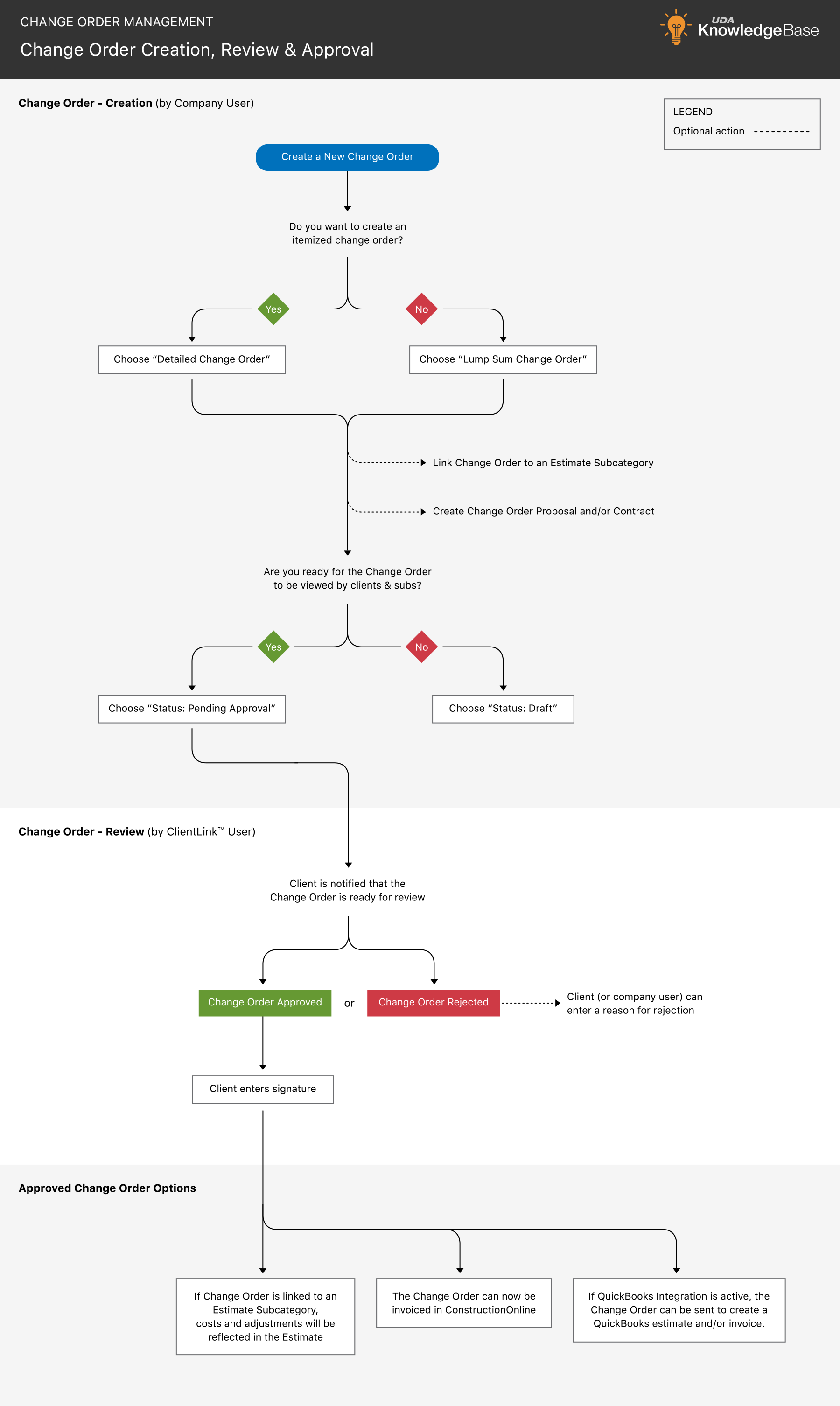

Here's how each stage maps to specific platform capabilities:
1. Change Orders are created online or in the mobile app and logged with a unique identifier to the associated project.
2. Change Orders are itemized down to materials, labor, and markup, with line items pulled from cost books or created as needed.
3. Change Orders are presented to clients as professional, branded Change Order Proposals & Contracts.
4. Clients review, approve or reject, and electronically sign Change Orders through a convenient online portal.
5. Automated notifications keep internal team members, subcontractors, clients, and other assigned resources in the loop.
6. Invoices can be generated directly from Change Orders, with built-in tools to track payment status through closeout.
The result isn't just a cleaner change order process; it's a workflow that scales, that survives staff transitions, and that produces the kind of defensible documentation that protects your construction business across every project.
 Want to see ConstructionOnline's workflow in action?
Watch our on-demand webinar—Discover Better Change Order Management. We'll walk through the full change order lifecycle with practical guidance and best practices for successful change order management.