
A subcontractor crew is available to start next week. Before you can confirm it, someone has to verify the plans are the current revision, check on a delivery running behind, and track down an approval that's still sitting open.
The information exists. It's just not in one place. One piece is in an email, another's in a text thread, and the person who knows the rest is out on a different jobsite.
By the time it all comes together, the crew has committed to someone else.
This is a composite scenario, but the dynamic is familiar: production depends on how well people coordinate the work around the work. When skilled labor is this hard to come by, time spent chasing down information gets a lot more expensive.
NAHB's September 2026 survey found that labor shortages across the trades it's tracked since 1996 now average 47%, higher than during the 2004–2006 building boom, even though housing starts are running at less than half the pace they did then. In five trades, including framing and concrete work, more than half of builders report shortages of both subcontractors and their own direct-hire crews. Whatever's driving that, it isn't simply a hot market absorbing every available worker. It's structural, and it makes every hour spent coordinating cost more than it used to.
AI can't supply a missing crew. What it can do is cut down on the administrative work competing for the attention of the people responsible for getting the right crew to the right job at the right time. That's a practical reason to take AI seriously, not as a replacement for skilled labor, but as a way to get more out of the people managing it.
That naturally raises the question a lot of construction leaders are quietly asking: does this mean AI replacing people? Not the people doing the work, no. AI can't frame a wall, pour a footing, or run conduit. What it can do is reduce the redundant work layered on top of that labor: the repeated data entry, the status chasing, the time spent re-confirming information that should have been settled once.
Ignore that distinction long enough, and here's the actual risk: not that AI takes your estimators' jobs, but that your best estimators and project managers burn out on logistics before they ever get to the parts of the job they're good at, and eventually leave for a company that figured this out first.
The Back Office Is Part of Production
Every project your company takes on brings another set of commitments to track. Documents need review. Change orders need approval. Vendors need answers. Clients want to know what happens next.
In a smaller operation, a few experienced people can hold most of that together through memory and frequent conversation. As the business grows, those same people can become the point almost every question has to pass through.
The office manager knows which subcontractor agreement is still outstanding. The project manager knows why the schedule shifted. The owner knows what was promised to the client. Their knowledge is valuable. Having to interrupt them repeatedly to retrieve it puts a ceiling on how much work the business can actually handle.
Picture a project manager getting ready for a client call tomorrow morning. Before that call happens, they'll spend the better part of an hour piecing together where the schedule stands, whether the last few RFIs got answered, and how the budget compares to what was estimated. That information usually lives in three or four different places: a shared drive, a handful of text threads, somebody's memory of a conversation from Tuesday.
None of that hour is the hard part of the job. The hard part comes next: reading what the client isn't saying outright, deciding whether to hold firm on a change order or make the call to bend, figuring out how to deliver news nobody wants to hear. That's the work that takes years on jobsites to learn to do well, and it's exactly the work that gets squeezed when prep eats into the time available for it.
An estimator loses time the same way, just earlier in the project. Pricing a bid well means checking current material costs, confirming what a sub actually quoted versus what got remembered secondhand, and making sure the scope in the proposal matches what was walked with the client. When that information lives in a current cost database instead of last quarter's spreadsheet copy, the estimator spends their hour on the judgment calls in the pricing, not on tracking down whether the numbers are even right.
We've made the case before that scattered, inconsistent data is what keeps AI from being genuinely useful to a construction business. The flip side is just as true, and arguably more urgent: scattered data is also what's quietly draining the time of the people hardest to replace.
Adding headcount may eventually be necessary as the business grows. But before expanding the team just to keep up with administrative volume, it's worth asking a more specific question: how much of the day requires real experience and judgment, and how much goes toward locating, copying, reformatting, or relaying information that already exists somewhere?
Connect the Work Before Automating the Handoffs
Giving people access to project information is a good start, but it's not the same as fixing the coordination problem.
A portal that lets your team check schedules, daily logs, or approvals from the field, the office, or home is genuinely useful. But access alone doesn't change how the work actually moves. If a superintendent uploads a field update and the office still calls to get the same information, the digital version has become an extra step, not a replacement for the old one. If a client approves a change in a portal but someone still has to manually notify those affected, the business is still running on phone tag, just with better software underneath it.
The value shows up when information recorded once can drive what happens next. A field note about a delayed delivery, tied to the right project and visible to the office, is useful on its own. Add an AI assistant that can summarize the issue or draft a follow-up, and a workflow that routes a task to the right person—the project manager's job shrinks to confirming the delivery and coordinating the trades it affects, instead of first figuring out there's a problem at all.
What matters is reducing the effort between someone recording information and someone else being able to act on it. That's the practical test for any connected system: does it make someone's job measurably easier, or does it just add a second place the same information has to live?
The Lever That's Actually Within Reach
A connected system fixes the coordination problem. It doesn't fix the harder one underneath it: there still aren't enough people.
Pay increases and recruiting pipelines matter there. So does training the next generation of tradespeople before you need them. So does keeping the workers you do bring on from walking back out the door within their first year.
None of that changes how much time your current estimators and project managers have today, though, which is exactly why it's worth asking a narrower question.
How much of your team's day goes toward searching for information and chasing status, versus the decisions that only someone with their experience can make? That's the lever that's actually within reach this week, without waiting on the labor market to loosen up.
Research from Intuit backs this up. The highest-growth construction firms spend 47% more on technology than the average construction firm, not because they have people to spare, but because freeing up the people they already have is how they keep growing without adding headcount they can't find anyway.
That same research is also a useful warning against doing this carelessly. Intuit found that the average construction firm wastes roughly $11,000 a year on technology nobody fully adopted. Reclaiming capacity isn't about buying another tool and hoping it helps. It's about picking one place where your team's time is genuinely going to waste and fixing that specific thing first.
Where the Line Should Be: Judgment Stays Human
None of this means handing a project manager's job to a piece of software. It means getting specific about which parts of the job are information-gathering and which parts are judgment calls, and keeping those two things separate.
That's also where the distinction between AI and conventional automation actually matters, not as a technical detail, but as a practical guide to where each one belongs. A reminder triggered by an approaching deadline doesn't need judgment; a conditional rule has handled that kind of thing since the early days of a spreadsheet. Interpreting a field note or drafting a readable summary is different, and that's where AI adds value. Zapier's own research on this found that even among the companies furthest along, only about 18% of their workflow steps actually use AI. The rest still run on rules and conventional automation, and the workflows that reserve AI for the steps that genuinely need intelligence or interpretation cost 71% less to run than the ones that route everything through a model. The job isn't to use AI everywhere. It's to find the specific places where interpretation, not repetition, is the actual bottleneck.
The same logic applies to the decisions themselves, not just the tasks. Preparing a client update for someone to review is a different kind of decision than sending it automatically. Suggesting a follow-up task is different from committing a subcontractor to a new start date. Summarizing correspondence is different from approving a change in scope. The first version in each pair is where AI is useful today. The second should stay with the person accountable for the outcome.
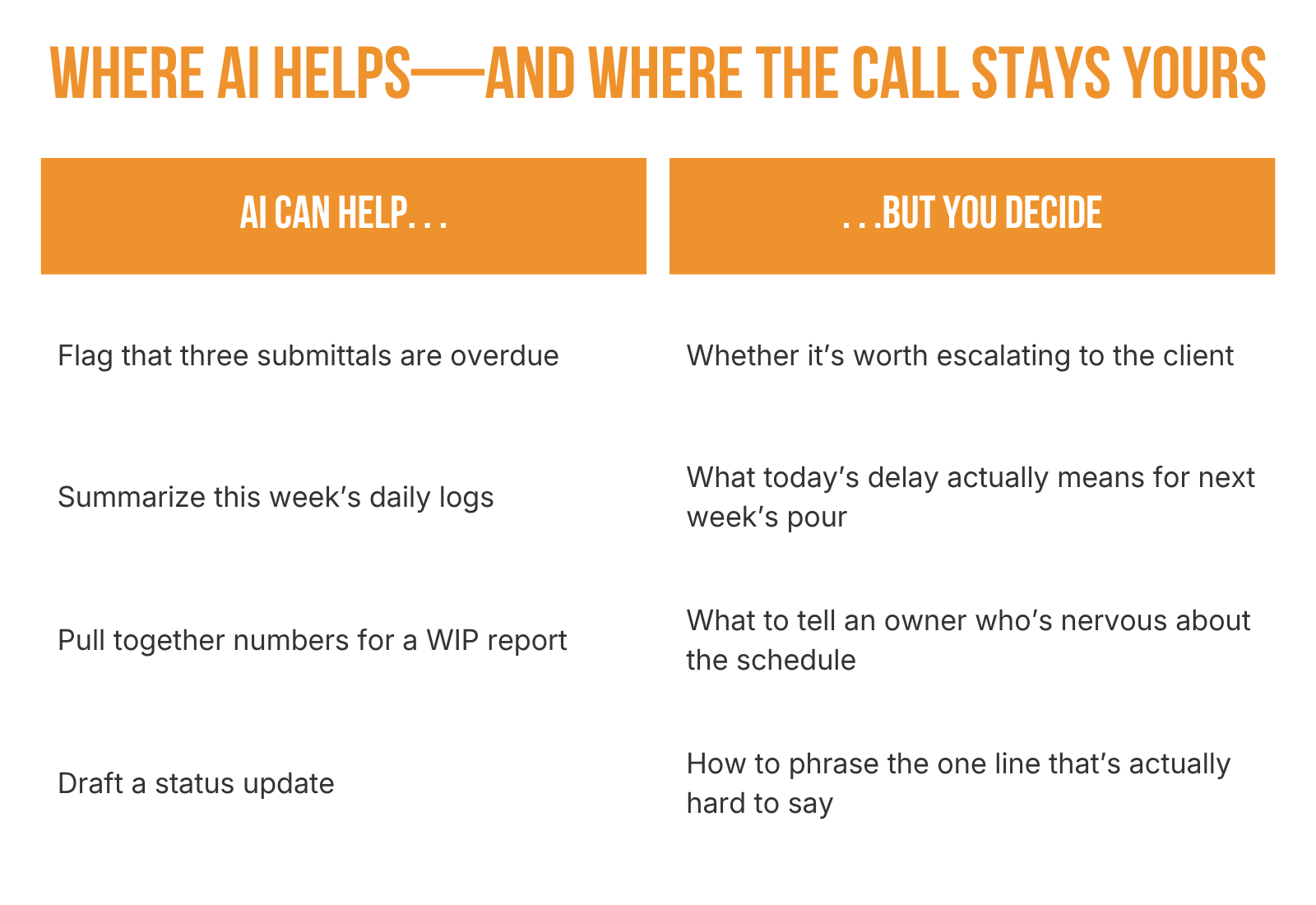 A tool has no business deciding how to handle a subcontractor who's been slow on the last three jobs. That's a relationship, and a judgment call, that belongs to the person who has to live with the outcome. The same goes for negotiating a change order or reading a client's hesitation in a selections meeting.
Introducing this well starts with a defined scope. Give the tool one specific task, decide who reviews the result before it goes anywhere, and make sure that person actually has access to the records behind it. It's also worth checking what the tool can see, and whether that access respects the same permissions your team and your trade partners already work under.
 Where AI Can Actually Help Today
None of this is a future-tense idea. Teams that keep their daily logs, RFIs, schedules, and financials in one connected system, instead of scattered across email, text threads, and spreadsheets, are already getting hours back every week, not because a tool is making decisions for them, but because nobody's hunting for the current version of anything.
A few places this plays out in practice:
-
Making information useful, not just stored. Receiving a document is only the start of the work. Someone has to identify what it is, connect it to the right project, and figure out who needs to see it. AI tools built for document processing can help classify incoming files, pull out the relevant details, or prepare a short summary for review, and an assistant connected to project records can help someone find information without digging through folders or interrupting a colleague to ask. The payoff isn't just faster filing. It's that the person who used to spend twenty minutes finding the right delivery ticket now spends that twenty minutes resolving the actual issue with the vendor.
-
Cutting the chase out of agreement follow-up. Subcontractor and vendor agreements involve a lot of repetitive work that has nothing to do with the agreement's terms: preparing correspondence, routing documents, checking signature status, following up on what's still outstanding. Templates, e-signatures, and rule-based reminders already handle part of that. AI can add to it by drafting a follow-up message or summarizing a thread of correspondence for the person managing the agreement. The scope, pricing, and approval authority stay exactly where they are. What changes is how much effort it takes to keep an established process moving, which leaves more time to deal with the actual reason an agreement is stalled.
-
Keeping clients and owners informed with less prep. A routine project update usually means reviewing recent activity, identifying what's been completed, checking what's coming up, and turning all of that into something worth reading. An AI assistant with access to the right records can draft that update; the person sending it still confirms the facts, adds context, and adjusts the tone for the relationship. What that buys back is time for the conversation that actually needs a person: explaining a delay, walking through a tradeoff, helping someone understand a decision that affects their schedule or their budget.
With tools like ConstructionOnline's Daily Logging, Messaging & Chat, and TrueVision Business Intelligence, the information behind all three of these lives in one place your team actually looks at, instead of a dozen places nobody fully trusts. The next step is making that information easier to act on without someone having to go looking for it first, which is exactly what Colby, ConstructionOnline's new AI assistant, is built to do.
Measure the Capacity You Get Back
A useful first step is small and specific: pick one recurring workflow, like weekly client updates or follow-up on outstanding agreements, and get honest about how it works today. Then look at the total effort once AI or automation is introduced, including the time spent reviewing and correcting what it produces. A tool that saves twenty minutes gathering information but creates thirty minutes of cleanup hasn't actually helped.
Judge it by what it frees up, not by how much it produced. Are people spending less time gathering information before they can act on it? Are approvals easier to track? Are vendor questions reaching the right person sooner, with fewer interruptions to someone out in the field? And just as important: what happens to the time that gets freed up? The value is real when that time goes toward confirming site readiness, resolving a scope question, or getting ahead of a schedule problem before it costs something. It's wasted if it just evaporates.
The Bottom Line
The labor shortage isn't solved by a single piece of software, and nobody should pretend otherwise. By NAHB's own numbers, it's worse right now than it was during the last building boom, even with far less construction happening. No dashboard changes that.
But if the shortage means every hour of your current team's time matters more than it used to, the real opportunity with AI isn't replacing the people you have. It's making sure the people you've already got—and can't easily replace—spend their time on the work that actually needs them: the judgment calls, the relationships, the decisions nobody else on the team is positioned to make.
Do more with less isn't a slogan here. It's the only lever actually available to a construction company that can't hire its way out of a market like this one. Less time chasing documents can mean more time coordinating vendors. Less prep for a routine update can mean more attention to the client who needs it. The companies pulling ahead right now aren't the ones waiting for hiring to get easier. They're the ones figuring out how to pull that lever first.
What could this look like for your team?
The opportunity starts with making better use of the project information your team already manages. Meet Colby, ConstructionOnline's new AI assistant, and explore how asking questions in plain language can help your team spend less time searching for information and more time putting it to work.
Explore the Free Colby AI Ebook →
Want a closer look? Join our upcoming Colby AI webinar.